View Full Version : New Feature Initial Delay option & Tabata round timer tweak!!
thebutcher
06-01-2009, 07:29 AM
Hey Tim,
First up, thanks for creating this great timer, I use it everyday in my gym, its great. I have a suggestion, its not really a must but it could fit into the 'would be nice' category. An initial delay timer. E.G. another timer that counts down before the rounds start.
The other suggestion is a Tabata round timer tweak.
When I do a Tabata work out I use an audio file I made, it goes like this
3min rounds;
20 sec > bell sound
10 sec > bell sound
20 sec > bell sound
10 sec > bell sound
and continues like this for 3 mins then > Bell sound
1 min rest
then repeats until I press stop on the media player
During the 20 second period I go 100% speed and power
During the 10 second period I bounce on the spot, duck and weave etc..
I do 8 - 10 of these rounds on my stamina days, its a great simulation of the fitness level you need for the ring.
It would be great if you could incorporate this type of intervals into your timer. Again a 'nice to have'. I'm not sure how well I explained this, I can upload a copy of the audio file for further clarity if you wish.
Thanks again and best regards !
Butch:eek:
First up, thanks for creating this great timer, I use it everyday in my gym, its great. I have a suggestion, its not really a must but it could fit into the 'would be nice' category. An initial delay timer. E.G. another timer that counts down before the rounds start.
Hi Butch, Glad to hear you like the timer.
There actually *IS* a delay option already, it's called "Delay before Start" and is in the lower right hand corner of the options. How's that for customer service? :)
The other suggestion is a Tabata round timer tweak.
When I do a Tabata work out I use an audio file I made, it goes like this
3min rounds;
.......
During the 20 second period I go 100% speed and power
During the 10 second period I bounce on the spot, duck and weave etc..
Interesting. Right now the timer can do alternating regular/high intensity intervals, but the duration of each interval must be equal. For example, if you set Interval Length to 15 seconds, you'll get 15 seconds of "Regular Intensity", then a sound (determined via Interval Sound) , then 15 seconds of "High Intensity".
So it sounds like you want the ability to have a high intensity interval of 20 seconds, and a regular intensity interval of 10 seconds? Or more generally stated, the ability to vary the Regular interval length and High interval length?
thebutcher
06-05-2009, 08:13 AM
Hi Butch, Glad to hear you like the timer.
There actually *IS* a delay option already, it's called "Delay before Start" and is in the lower right hand corner of the options. How's that for customer service? :)
:eek: Totally did not see that.. Take note kids, 20 years of being punched in the face has an effect on your peepers. Fantastic customer service :D
Interesting. Right now the timer can do alternating regular/high intensity intervals, but the duration of each interval must be equal. For example, if you set Interval Length to 15 seconds, you'll get 15 seconds of "Regular Intensity", then a sound (determined via Interval Sound) , then 15 seconds of "High Intensity".
So it sounds like you want the ability to have a high intensity interval of 20 seconds, and a regular intensity interval of 10 seconds? Or more generally stated, the ability to vary the Regular interval length and High interval length?
That's exactly what I mean. And thank you for the response it is much appreciated.
Butch, This enhancement would be helpful for a lot of people, so I'm in the process of adding it. It could take a week or more until it's finally available, check back soon.
There is a lot of testing I have to do etc.
That's exactly what I mean. And thank you for the response it is much appreciated.
Butch,
Here's a test implementation. Give it a shot and let me know what you think.
http://www.speedbagforum.com/timerbeta.html
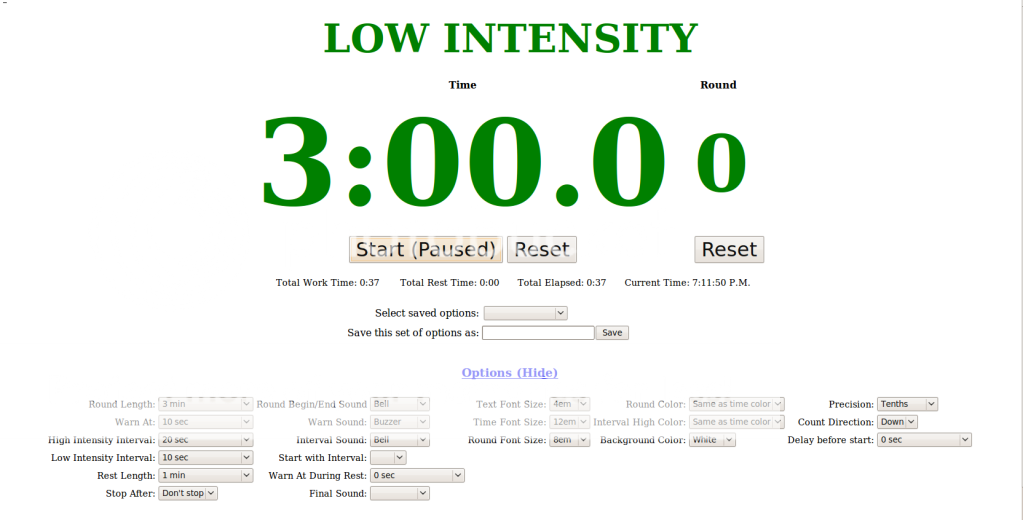
There are some important new settings, as shown in the attached screenshot. You need to set the "High Intensity Interval" and "Low Intensity Interval".
You can optionally set which interval is used first (high or low) and the transition sound, if any.
Lastly, this is a test version. It will take some time to finish all the testing and what not before I declare it a final version.
Lastly, depending on what web browser you are using, you may encounter cookie problems. Internet Explorer (especially the older versions) have severe limitations on cookies. The final version won't have this problem because it will automatically upgrade your existing cookies, rather than keeping duplicates.
The beta version will now upgrade cookies (saved options) from the previous version. It also does so in a minimized space format, so there should be less cookie overload problems with this version of the timer.
thebutcher
06-26-2009, 06:58 AM
Hi Tim,
Firsty Thanks alot putting in the time to make the modifications to the timer. :D
Second sorry for the late reply, I have not been training for the last couple of weeks, I was studing for a CISCO certification, the good news is I got it so I am back in the gym at last.
I have tried out the new timer today and it seems to stop counting at the end of the first interval
I am using Ubuntu/9.04 (jaunty)x64 bit with Firefox/3.0.11
I'm not sure what I may be doing wrong, but i'll keep playing around and report back
I have tried out the new timer today and it seems to stop counting at the end of the first interval
I am using Ubuntu/9.04 (jaunty)x64 bit with Firefox/3.0.11
I'm not sure what I may be doing wrong, but i'll keep playing around and report back
Is "stop after:" (Lower left hand corner, options) set to anything?
thebutcher
06-27-2009, 05:26 AM
Is "stop after:" (Lower left hand corner, options) set to anything?
It was set to Dont Stop
I also Tried it on 1 + 2 rounds but that did not work either - same symptoms
something that I did not mention before either
when I press START the countdown does not start. But if I then press Start: (Paused) the countdown begins.
Initial press of Start
http://i671.photobucket.com/albums/vv74/brad_searle/timer1.png
Press of START (PAUSED)
http://i671.photobucket.com/albums/vv74/brad_searle/timer2.png
Timer stopping after the first interval
http://i671.photobucket.com/albums/vv74/brad_searle/timer3.png
Great screenshots,that should help me repro the error.
Can you also turn on the "Error Console" (it's under "Tools" menu) and see if that lists anything? You should Clear it then try the timer again, then screenshot any errors that show up.
I'm guessing a javascript error is happening at the end of the first interval...
thebutcher
06-28-2009, 12:46 AM
Great screenshots,that should help me repro the error.
Can you also turn on the "Error Console" (it's under "Tools" menu) and see if that lists anything? You should Clear it then try the timer again, then screenshot any errors that show up.
I'm guessing a javascript error is happening at the end of the first interval...
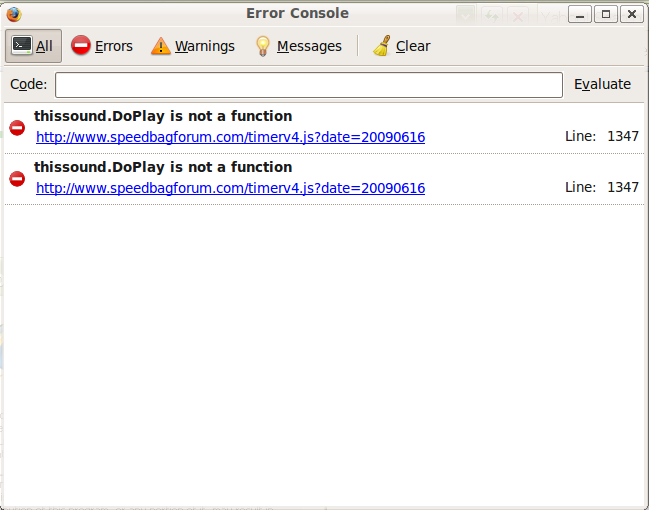
Here is the error console
http://i121.photobucket.com/albums/o206/bradsearle/errorconsole1-1.png
When I clicked the link the error was high lighted right down the end of the script
function PlaySound(soundsrc)
{
var sound = document.getElementById("Sound");
if ( sound )
sound.src = soundsrc; // IE
else
{
// Firefox and others..
var thissound=document.getElementById(soundsrc);
try
{
thissound.Play();
}
catch(e)
{
thissound.DoPlay();
}
}
}
P.S. I tried the timer on a windows XP box with IE7 and the timer worked perfectly.
Ok, that error means it's unable to play the sounds.
Can you try this:
http://www.speedbagforum.com/forums/showthread.php?t=749
That may resolve the problem.
thebutcher
07-02-2009, 06:10 AM
Ok, that error means it's unable to play the sounds.
Can you try this:
http://www.speedbagforum.com/forums/showthread.php?t=749
That may resolve the problem.
Hey Tim,
I tried that and it did not work for me. :(
bstrong
07-04-2009, 11:43 PM
Tim,
After I've found a work and rest length that I like how do I go about creating a mp3 or mp4 file of it so I can have it on my ipod?
Thanks in advance.
Thomas
thebutcher
07-05-2009, 03:59 AM
Tim,
After I've found a work and rest length that I like how do I go about creating a mp3 or mp4 file of it so I can have it on my ipod?
Thanks in advance.
Thomas
What did you have in mind ? I have one that goes for 3mins and is 20sec High and 10sec low with 1 minute rest I can upload
megabuff
09-04-2009, 10:02 AM
great stuff thanks Tim
i was about to request this mod and i saw that you had already done it :-)
Could you put in the option of having 2 different alarms one for the start of the high intensity and one the the low intensity. just for those of us who get confused about which one is which is which.
thanks
Kev
megabuff
09-04-2009, 10:08 AM
one other thing Tim
this link http://www.speedbagforum.com/timerbeta.html
is not the same as your latest version.
So you newest version doesnt have these low and higth intensity features.
Will the http://www.speedbagforum.com/timerbeta.html version woek off line the same as the other one does?
great stuff thanks Tim
Glad to hear you like it!
one other thing Tim
this link http://www.speedbagforum.com/timerbeta.html
is not the same as your latest version.
Yeah, the beta link is the test version, I put it out there for a few weeks (or months sometimes) to let people find any bugs or problems (There's at least one that I know of, but been too busy to fix it.). Once it's fairly solid, I move it to the regular link.
So you newest version doesnt have these low and higth intensity features.
Sort of, the beta link is actually the newest version.
Will the http://www.speedbagforum.com/timerbeta.html version woek off line the same as the other one does?I may get off my butt and fix that remaining bug this weekend, then I'll package it up into the .zip file, and you'll be able to use it offline... it's a 3 day weekend, so I'll have time somewhere... Check back on Tuesday :)
Could you put in the option of having 2 different alarms one for the start of the high intensity and one the the low intensity. just for those of us who get confused about which one is which is which.
Yeah, I think I can do that. I'll update it when I finish out the code for the latest release this weekend.
Could you put in the option of having 2 different alarms one for the start of the high intensity and one the the low intensity. just for those of us who get confused about which one is which is which.
DONE!
Will the http://www.speedbagforum.com/timerbeta.html version woek off line the same as the other one does?
and DONE!
Use the latest versions here: http://www.speedbagforum.com/timer (online) or http://www.speedbagforum.com/timer.zip (offline)
I split out the "Interval Sound" option to be "High Interval Sound" and "Low Interval Sound" (see screenshot).
I also updated the timer.zip file to have this latest version. If you find any bugs, let me know!
vBulletin® v3.8.4, Copyright ©2000-2012, Jelsoft Enterprises Ltd.